
The LLaMA 3 generative AI model was released by Meta a couple of days ago, and it already shows impressive capabilities.
Learn how to install and deploy LLaMA 3 into production with this step-by-step guide. From hardware requirements to deployment and scaling, I cover everything you need to know for a smooth implementation.
Introduction to LLaMA 3
Meta has introduced initial versions of their Llama 3 open-source AI model, which can be utilized for text creation, programming, or chatbots. Furthermore, Meta announced its plans to incorporate LLaMA 3 into its primary social media applications. This move aims to compete with other AI assistants, such as OpenAI’s ChatGPT, Microsoft’s Copilot, and Google’s Gemini.
Similar to Llama 2, Llama 3 stands out as a freely accessible large language model with open weights, offered by a leading AI company (although it doesn’t qualify as “open source” in the conventional sense).
Currently, Llama 3 can be downloaded for free from Meta’s website in two different parameter sizes: 8 billion (8B) and 70 billion (70B). Users can sign up to access these versions. Llama 3 is offered in two variants: pre-trained, which is a basic model for next token prediction, and instruction-tuned, which is fine-tuned to adhere to user commands. Both versions have a context limit of 8,192 tokens.
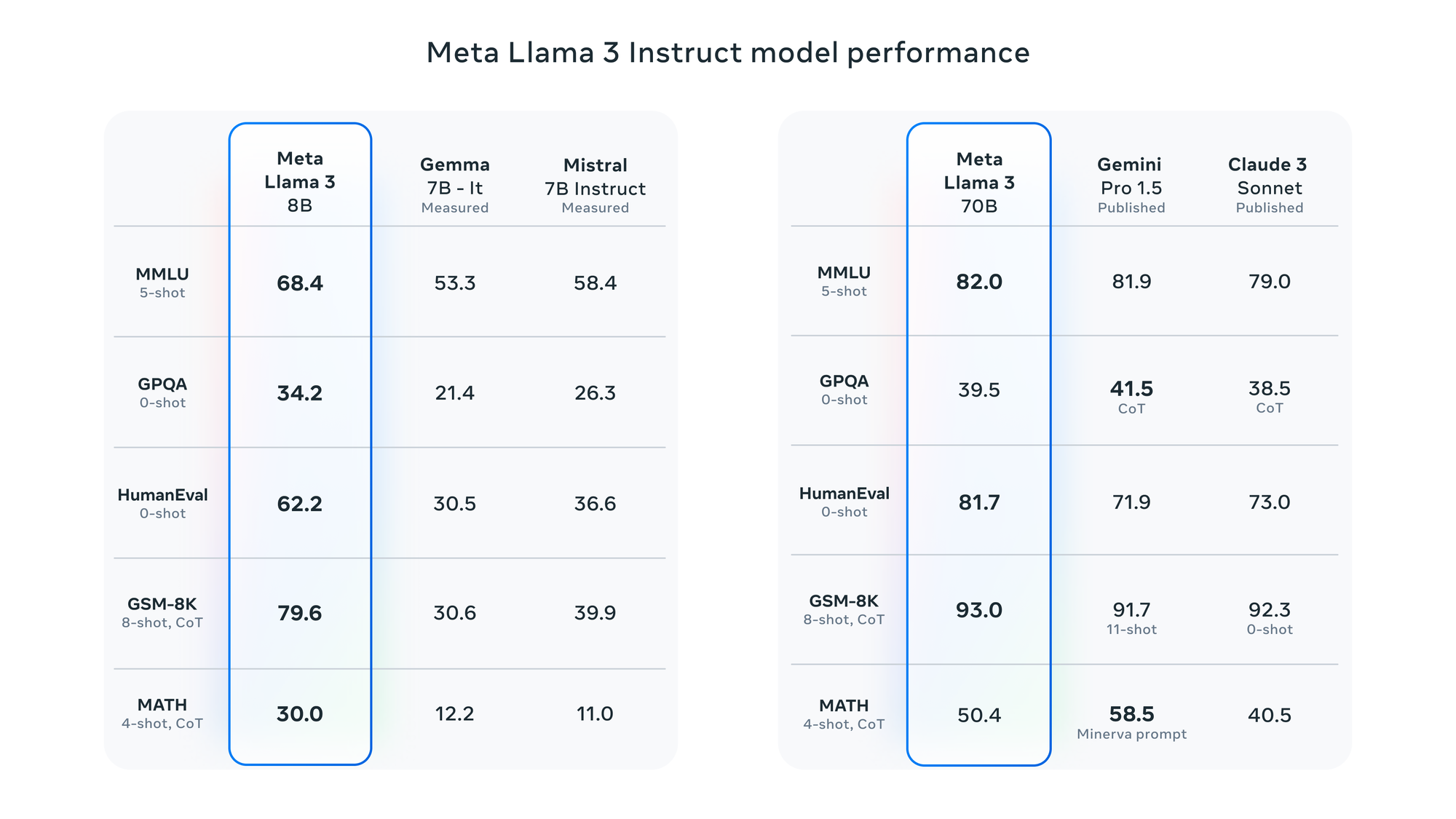
In an interview with Dwarkesh Patel, Mark Zuckerberg, the CEO of Meta, mentioned that they trained two custom-built models using a 24,000-GPU cluster. The 70B model was trained with approximately 15 trillion tokens of data, and it never reached a point of saturation or a limit to its capabilities. Afterward, Meta decided to focus on training other models. The company also revealed that they are currently working on a 400B parameter version of Llama 3, which experts like Nvidia’s Jim Fan believe could perform similarly to GPT-4 Turbo, Claude 3 Opus, and Gemini Ultra on benchmarks like MMLU, GPQA, HumanEval, and MATH.
According to Meta, Llama 3 has been assessed using various benchmarks, including MMLU (undergraduate level knowledge), GSM-8K (grade-school math), HumanEval (coding), GPQA (graduate-level questions), and MATH (math word problems). These benchmarks demonstrate that the 8B model outperforms open-weights models such as Google’s Gemma 7B and Mistral 7B Instruct, and the 70B model is competitive against Gemini Pro 1.5 and Claude 3 Sonnet.
Meta reports that the Llama 3 model has been improved with the ability to comprehend coding, similar to Llama 2, and for the first time, it has been trained using both images and text. However, its current output is limited to text.
LLaMA 3 Hardware Requirements And Selecting the Right Instances on AWS EC2
As many organizations use AWS for their production workloads, here is how to deploy LLaMA 3 on AWS EC2.
There are multiple obstacles when it comes to implementing LLMs, such as VRAM (GPU memory) consumption, inference speed, throughput, and disk space utilization. In this scenario, I need to make sure that I allocate a GPU instance on AWS EC2 with sufficient VRAM capacity to run the models.
LLaMA 3 8B requires around 16GB of disk space and 20GB of VRAM (GPU memory) in FP16. You could of course deploy LLaMA 3 on a CPU but the latency would be too high for a real-life production use case. As for LLaMA 3 70B, it requires around 140GB of disk space and 160GB of VRAM in FP16.
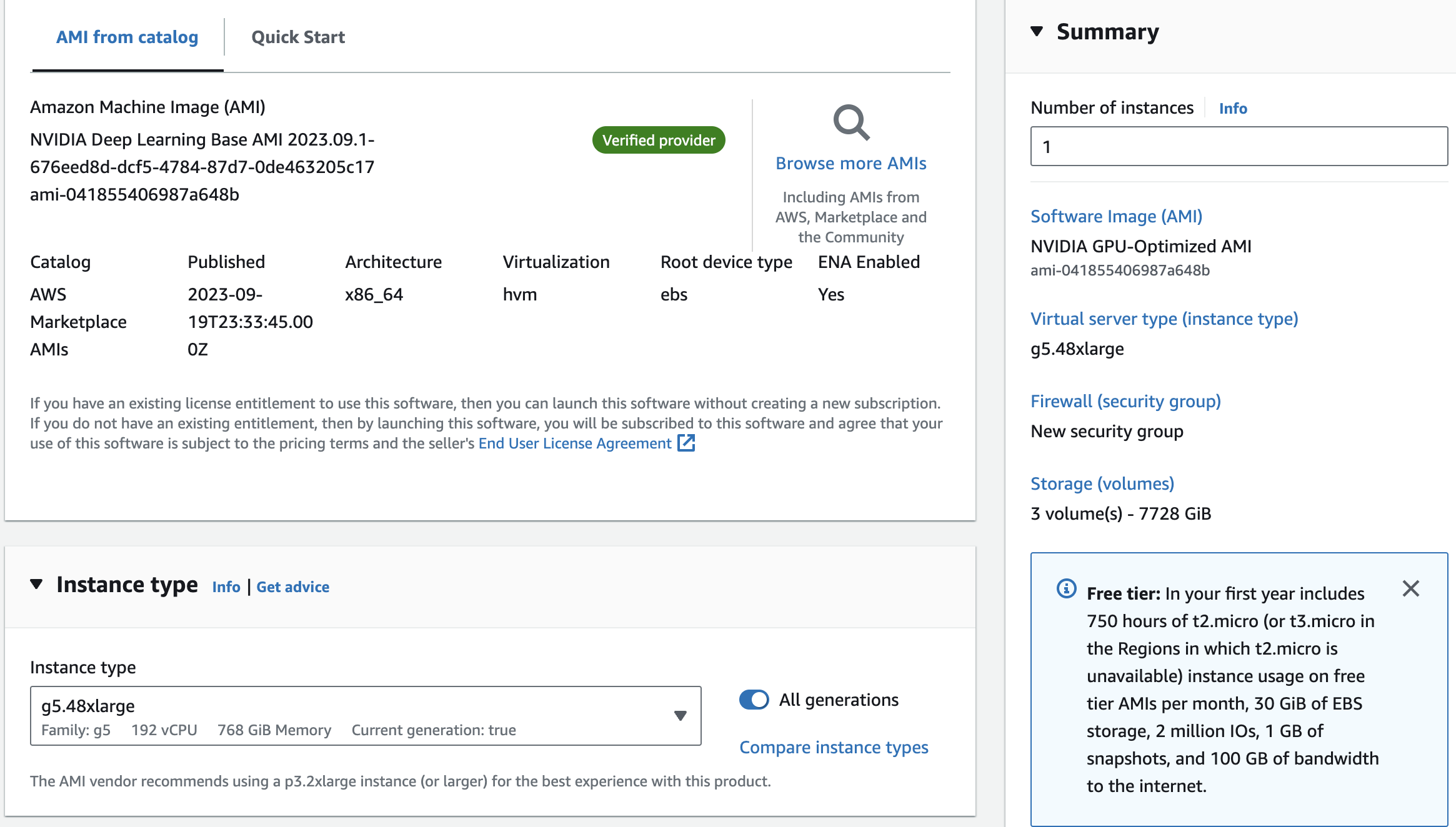
Getting your hands on 20GB of VRAM for LLaMA 3 8B is fairly easy. I recommend that you provision an NVIDIA A10 GPU: this GPU comes with 24GB of VRAM and it is a fast GPU based on the Ampere platform. On AWS EC2, you should select a G5 instance in order to provision an A10 GPU. A g5.xlarge will be enough.
Deploying the LLaMA 3 70B model is much more challenging though. No GPU has enough VRAM for this model so you will need to provision a multi-GPU instance. If you provision a g5.48xlarge instance on AWS you will get 192GB of VRAM (8 x A10 GPUs), which will be enough for LLaMA 3 70B.
In such a configuration, you can expect the following latencies (response times): 50 tokens generated in 1 second for LLaMA 3 8B, and 50 tokens generated in 5 seconds for LLaMA 3 70B.
In order to decrease the operating cost of these models and increase the latency, you can investigate quantization techniques but be aware that such optimizations can harm the accuracy of your model. Quantization is out of the scope of this article.
In order to provision such instances, log into your AWS EC2 console, and launch a new instance: select the NVIDIA deep learning AMI, on a g5.xlarge or g5.48xlarge instance. Do not forget to provision enough disk space too.
Production Inference With vLLM
vLLM is a library designed for rapid and easy LLM inference and deployment. Its efficiency is attributed to various sophisticated methods, including paged attention for optimal management of attention key and value memory, real-time processing of incoming queries in batches, and personalized CUDA kernels.
In addition, vLLM provides a high degree of adaptability by employing distributed computation (using tensor parallelism), real-time streaming, and compatibility with both NVIDIA and AMD graphics cards.
Specifically, vLLM will greatly aid in deploying LLaMA 3, so I can use AWS EC2 instances equipped with several compact NVIDIA A10 GPUs. This is advantageous over using a single large GPU, such as the NVIDIA A100 or H100. Furthermore, vLLM will significantly enhance the model’s efficiency through continuous batch inference.
Setting up vLLM is quite simple. Establish an SSH connection to the AWS instance you just created, and install vLLM using pip:
pip install vllm
Since I plan to perform distributed inference using vLLM on 8 x A10 GPUs, the installation of Ray is required as well:
pip install ray
In case you encounter compatibility problems while installing, it may be simpler for you to compile vLLM from the source or use their Docker image: have a look at the vLLM installation instructions.
Launch the Inference Server
Here is the Python inference script:
from vllm import LLM

# Use LLaMA 3 8B on 1 GPU
llm = LLM("meta-llama/Meta-Llama-3-8B-Instruct")

# Use LLaMA 3 70B on 8 GPUs
# llm = LLM("meta-llama/Meta-Llama-3-70B-Instruct", tensor_parallel_size=8)

print(llm.generate("What are the most popular quantization techniques for LLMs?"))
You can run the above script. If this is the first time you run this script, you will need to wait for the model to be downloaded and loaded on the GPU, then you will receive something like this:
The most popular quantization techniques for Large Language Models (LLMs) are:
1. Integer Quantization
2. Floating-Point Quantization
3. Mixed-Precision Training
4. Knowledge Distillation
It’s quite simple to understand. You simply need to adjust the tensor_parallel_size according to the number of GPUs that you possess.
The next step is an inference server capable of managing numerous requests and executing simultaneous inferences. To begin, start the server:
For LLaMA 3 8B:
python -m vllm.entrypoints.openai.api_server \
--model meta-llama/Meta-Llama-3-8B-Instruct
For LLaMA 3 70B:
python -m vllm.entrypoints.openai.api_server \
--model meta-llama/Meta-Llama-3-70B-Instruct
--tensor-parallel-size 8
It should take up to 1 minute for the model to load on the GPU. Then you can start a second terminal and start making some requests:
curl http://localhost:8000/v1/completions \
-H "Content-Type: application/json" \
-d '{
    "model": "meta-llama/Meta-Llama-3-8B-Instruct",
    "prompt": "What are the most popular quantization techniques for LLMs?"
}'
You now have a proper production ready inference server that can handle many parallel requests thanks to continuous batching. At some point, if the number of requests is too high, the GPU will be overloaded though. In that case you will need to replicate the model on several GPU instances and load balance your requests (but this is out of the scope of this article).
Conclusion
As you can see, deploying LLaMA 3 into production does not require any complex code thanks to inference servers like vLLM.
Provisioning the right hardware is challenging though. First because these GPUs are very costly, but also because of the current global GPU shortage. If this is your first time trying to provision a GPU server at AWS you might not have the permission to create a GPU server. In that case you will need to contact support and explain your use case. In this article I used AWS EC2 but other vendors are available of course (Azure, GCP, OVH, Scaleway…).