Whether you’re a writer, data scientist or just skimming through sources to get a job done, reading longer texts to pluck out crumbs of information can be quite exhausting. Automating such elements of your work allows you to focus on the creative side of things.
Unless stated otherwise, all pictures in the article are by the author.
Text Summarization
Text summarization is the technique of extracting key informational elements of a voluminous text. Manual text summarization is a difficult and time-expensive task, so Natural Language Processing and machine learning algorithms became popular to automate it.
There are ready-made solutions on the market, whether in the form of libraries or ready-made tools for end-users.
In this article, I will prepare my own tailored solution, which at the same time does not require advanced knowledge of data science.
NLP Cloud
NLP Cloud is a provider of multiple APIs for text processing using machine learning models. One of these is the text summarizer, which looks promising in terms of simple implementation.
The summarizer provided by NLP Cloud is abstractive, which means that new sentences might be generated and parts with low information-noise ratio are removed.
Let’s see an example:
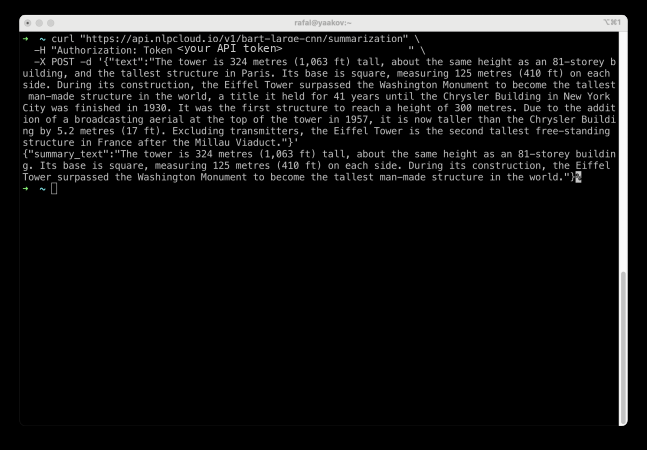
I pass a block of text, and the model returns a summary. But operating in a console is not very convenient. So, let’s make Google Docs summarize the selected text fragment this way.
Extending Google Docs
My goal is to create a convenient menu so that text summarization happens automatically from within Google Docs.
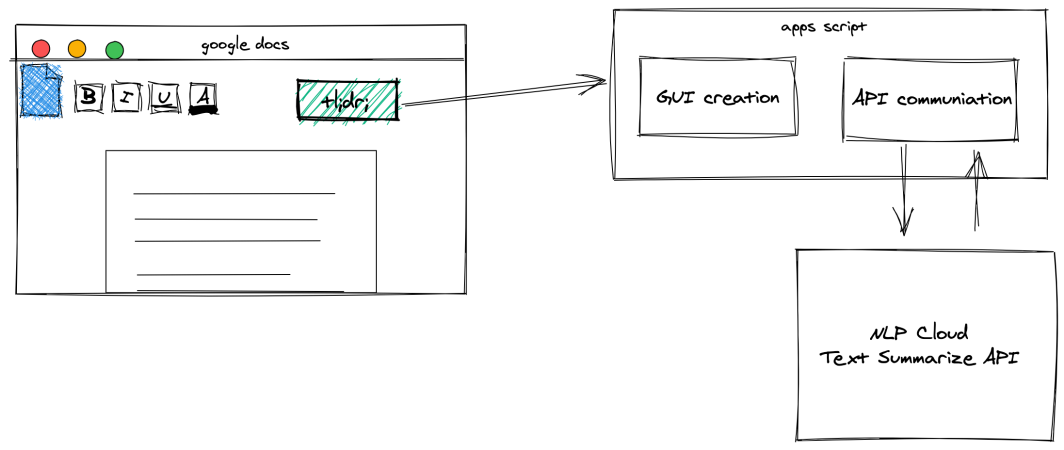
This is how my project is structured. Using Apps Script, I will extend the GUI with a button that will trigger functions that communicate with the NLP Cloud API and then insert the result below.
I will start by preparing an add-on for the menu.
Making Menu
Using Google Apps Script to add custom functionality to Google Docs is fairly easy. You can customize the user interface with new menus, dialog boxes and sidebars. To create a script, after opening Google Docs, select Tools -> Script editor.
All the interface elements should be added in this function: onOpen. It is run after opening the document and allows me to add the menu.
function onOpen() {
    var ui = DocumentApp.getUi();

    ui.createMenu('Text Summarizer')
        .addItem('Summarize selection', 'summarizeSelection')
        .addToUi();
}

function summarizeSelection() {
    // summarization function
}
After saving the script and refreshing Docs, you should find a new menu element “Text Summarizer”.
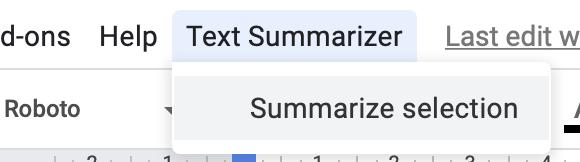
I must get the selected text and then implement the following function: summarizeSelection.
Get Selection
The tricky part is getting the currently selected text and passing it to functions. It is possible thanks to this function: getSelection.
DocumentApp.getActiveDocument().getSelection();
However, this function returns not only the highlighted part of the document, but a whole paragraph in which the selection resides. That’s why I create a more complex getSelectedText function:
function getSelectedText() {
var document = DocumentApp.getActiveDocument();
var body = document.getBody();
var text = "";

var selection = document.getSelection();
var parent = false;
var insertPoint

if (selection) {
    var elements = selection.getRangeElements();

    if(elements[0].isPartial()) {
    text = elements[0].getElement().asText().getText();
    text = text.substring(elements[0].getStartOffset(),elements[0].getEndOffsetInclusive()+1)
        parent = elements[0].getElement().getParent();
    } else {
    text = elements.map( function(element) {
        parent = element.getElement().getParent();
        return element.getElement().asText().getText();
    });
    }
    // Logger.log(text);
    if (parent) {
    insertPoint = body.getChildIndex(parent);
    }
}
return [text, insertPoint];
}
The function simply takes the entire paragraph and trims it down to just the selected fragment. It also returns the index of the paragraph so you know where to insert the summary.
Now, let’s send the text to the API and parse the result.
External APIs
I’ll use the following service to make API requests directly: UrlFetch. A Text Summarization API request requires authorization through a token.
The API being requested returns a raw JSON response for a request.
Remember that all text processed by this script is sent to an external API.
function summarizeSelection() {
    var document = DocumentApp.getActiveDocument();
    var selectedText = getSelectedText();
    var text = selectedText[0];
    var insertPoint = selectedText[1];

    if (text) {
        DocumentApp.getUi().alert(text);
        var url = 'https://api.nlpcloud.io/v1/bart-large-cnn/summarization';

        var response = UrlFetchApp.fetch(
        url,
        {
            'method': 'POST',
            'contentType': 'application/json',
            'headers':{
            'Authorization': 'Token <your API token>'
            },
            'payload': JSON.stringify({"text":text}),
            'muteHttpExceptions': true
        }
        );

        try {
        summary_text = JSON.parse(response.getContentText())['summary_text'];
        DocumentApp.getUi().alert(summary_text);

        } catch (e) {
        DocumentApp.getUi().alert('Something went wrong 🙁');
        }

    } else {
        DocumentApp.getUi().alert('You must select some text!');
    }

}
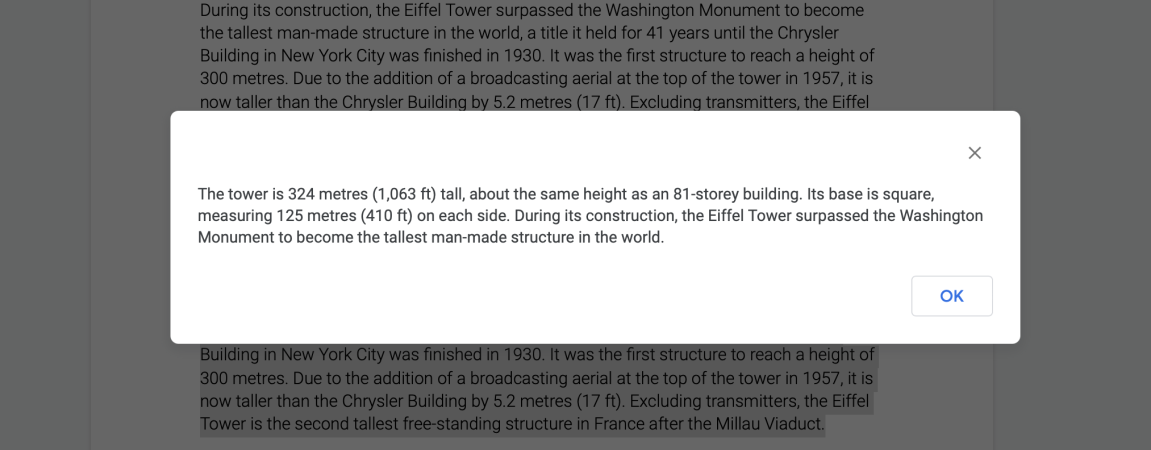
To test the functionality, just select a text fragment in Docs and choose Text Summarization -> Summarize selection from the Docs menu.
After a moment of processing, you should see a pop-up with the result, which you can even copy.
Writing response to document
Finally, I can insert an API-generated summary directly into the document. For ease of distinction, bold the text of the summary. That’s why the following function also returns the paragraph index of the selected text: getSelectedText.
This way I know exactly where to tell Apps Script to insert the new text.
function summarizeSelection() {
    var document = DocumentApp.getActiveDocument();
    var selectedText = getSelectedText();
    var text = selectedText[0];
    var insertPoint = selectedText[1];

    if (text) {
        DocumentApp.getUi().alert(text);
        var url = 'https://api.nlpcloud.io/v1/bart-large-cnn/summarization';

        var response = UrlFetchApp.fetch(
        url,
        {
            'method': 'POST',
            'contentType': 'application/json',
            'headers':{
            'Authorization': 'Token <your API token>'
            },
            'payload': JSON.stringify({"text":text}),
            'muteHttpExceptions': true
        }
        );

        try {
        summary_text = JSON.parse(response.getContentText())['summary_text'];
        DocumentApp.getUi().alert(summary_text);

        } catch (e) {
        DocumentApp.getUi().alert('Something went wrong 🙁');
        }
        //////////////
        var body = document.getBody();
        var summaryParagraph = body.insertParagraph(insertPoint+1, summary_text);
        summaryParagraph.setBold(true);
        //////////////
    } else {
        DocumentApp.getUi().alert('You must select some text!');
    }

}
Let’s test the final version.
Takeaways
Building an application that extends Google Docs functionality based on external APIs is an interesting alternative to building large systems to automate inconvenient work steps. Moreover, individual components can be replaced, depending on needs and specific skills. For example, my solution can be extended with emotion detection or text classification. You can also prepare your own API or simple functions directly in Apps Script.
Thank you for reading. I hope you enjoyed reading as much as I enjoyed writing this for you.